运行时刷新配置文件
运行时刷新配置文件
spring-cloud-context 方案
- 可以通过接口进行更改配置属性值并使其生效
- 全局生效,包括
@Value获取的值都会被改变
主要注解和方法
@RefreshScope
@Value("${tan.test}")
ContextRefresher contextRefresher
实现步骤
- 利用
@Value / @ConfigurationProperties(prefix = "")取值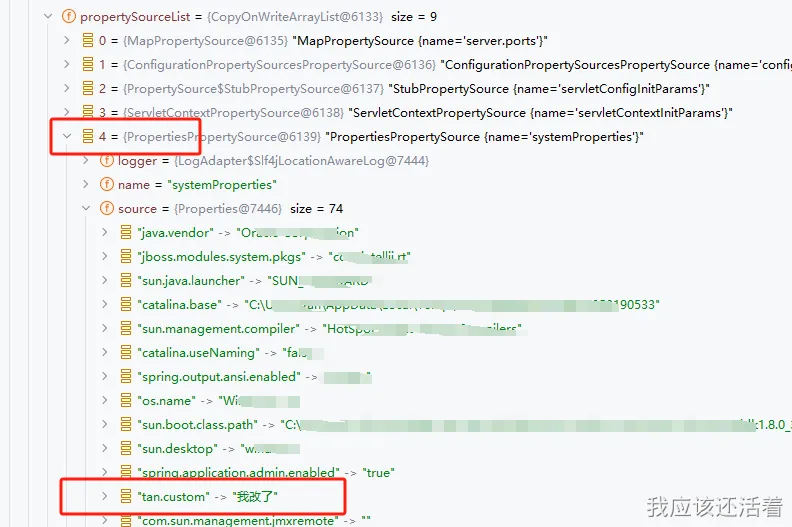
@Scheduled无法更新,运行了的任务是无法重置的除非取消掉有重新加载
- 在取值的类上加入
@RefreshScope- 被标注的注解检测到
refresh后会被销毁重建
- 被标注的注解检测到
- 利用
System.setProperty进行修改- 利用系统 property 的优先级高的特别覆盖配置文件中的值
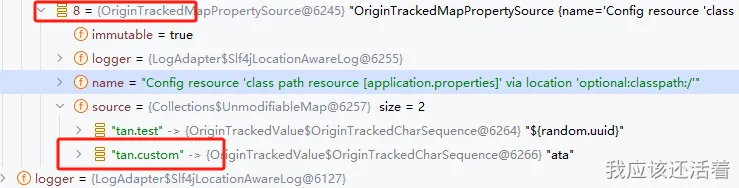
- 利用
contextRefresher.refresh()刷新- 将新的数据刷新上去
具体代码
<dependency>
  <groupId>org.springframework.cloud</groupId>
  <artifactId>spring-cloud-context</artifactId>
  <version>3.1.7</version>
</dependency>
## 使用随机数,方便测试刷新后值是否更改
tan.test=${random.uuid}
## 使用 System.setProperty 主动修改
tan.custom=ata
package com.example.contextrefresherdemo.springcloud;

import com.example.contextrefresherdemo.TestConfig;
import org.springframework.beans.factory.annotation.Autowired;
import org.springframework.beans.factory.annotation.Qualifier;
import org.springframework.beans.factory.annotation.Value;
import org.springframework.cloud.context.config.annotation.RefreshScope;
import org.springframework.cloud.context.refresh.ContextRefresher;
import org.springframework.web.bind.annotation.GetMapping;
import org.springframework.web.bind.annotation.RequestMapping;
import org.springframework.web.bind.annotation.RestController;

/**
 * 刷新配置文件中的指定值
 *
 * @author <a href="https://tannn.cn/">tan</a>
 * @date 2024/2/2 11:04
 */
@RestController
@RefreshScope
@RequestMapping("cloud")
public class RefresherPropertiesValue {

    @Qualifier("configDataContextRefresher")
    @Autowired
    private ContextRefresher contextRefresher;

    @Autowired
    private TestConfig testConfig;


    @Value("${tan.test}")
    private String test;

    @Value("${tan.custom}")
    private String custom;


    /**
     * 获取配置信息 tan.test
     * @return
     */
    @GetMapping("show")
    public String  show(){
        return test;
    }


    /**
     * 获取配置信息 tan.custom
     * @return
     */
    @GetMapping("show/custom")
    public String  showCustom(){
        return custom;
    }

    /**
     * 获取配置信息 tan.custom
     * @return
     */
    @GetMapping("show/bean")
    public String  showBean(){
        return testConfig.toString();
    }

    /**
     * 刷新配置信息
     */
    @GetMapping(path = "/refresh")
    public String refresh() {
        System.setProperty("tan.custom","我改了");
        // 新开一个线程进行配置信息的刷新,避免阻塞其他请求的处理
        new Thread(() -> contextRefresher.refresh()).start();
        // 返回刷新后的配置信息 - 获取的是上一个的(这个返回不准)
        return show();
    }
}
package com.example.contextrefresherdemo;

import lombok.Data;
import org.springframework.boot.context.properties.ConfigurationProperties;
import org.springframework.stereotype.Component;

/**
 * bean
 *
 * @author <a href="https://tannn.cn/">tan</a>
 * @date 2024/2/2 15:04
 */
@Component
@ConfigurationProperties(prefix = "tan")
@Data
public class TestConfig {

    private String custom;
}
Environment
- 可以通过接口进行更改配置属性值并使其生效
-
新的只能作用在
environment.getProperty("tan.custom")有效,- @Value / @ConfigurationProperties Bean 都不会拿新的值
@Scheduled不会拿新的值
package com.example.contextrefresherdemo.spring;

import org.springframework.beans.factory.annotation.Autowired;
import org.springframework.beans.factory.annotation.Value;
import org.springframework.core.env.ConfigurableEnvironment;
import org.springframework.core.env.MapPropertySource;
import org.springframework.web.bind.annotation.GetMapping;
import org.springframework.web.bind.annotation.RequestMapping;
import org.springframework.web.bind.annotation.RestController;

import java.util.Collections;

/**
 * 注解@value的值动态修改
 *
 * @author <a href="https://tannn.cn/">tan</a>
 * @date 2024/2/2 13:40
 */
@RestController
@RequestMapping("environment")
public class ValueRefresher {

    @Value("${tan.custom}")
//    @Value("#{environment.getProperty('tan.custom')}") // 解析并缓存SpEL表达式的值 所以不会拿的最新的值
    private String custom;

    @Autowired
    private ConfigurableEnvironment environment;

    /**
     * 获取配置信息 tan.custom
     * @return
     */
    @GetMapping("show/custom")
    public String  showCustom(){
        return custom;
    }

    /**
     * 获取配置信息 tan.custom
     * @return
     */
    @GetMapping("show/custom2")
    public String  showCustom2(){
        return environment.getProperty("tan.custom");
    }

    /**
     * 刷新配置信息
     */
    @GetMapping(path = "/refresh")
    public String refresh() {
        String property = environment.getProperty("tan.custom");
        System.out.println("旧的:"+property);
        // addFirst 把设置自己的放到最上面,用户覆盖下方的 相同属性名的值
        // 这里优先级非常高,system.property 都无法使其改变
        environment.getPropertySources().addFirst(new MapPropertySource("customProps", Collections.singletonMap("tan.custom", "新的")));
        return property;
    }

}